
AKETEK® VIEW AIR
Instructions for the VIEW AIR helmet and powered air-purifying respirator.
Quick-start guide
Fit the headgear: hold down the buttons on the side mounts and slide the headgear in until it clicks into position. Make sure the black headband faces into the helmet. Adjust the position for a comfortable fit.
Prepare the cover plates: remove the protective film from both sides of the outer and inner cover plates.
Adjust the settings: select welding or grinding mode with switch (1). Set sensitivity using the left-hand knob (2). Adjust the shade using the right-hand knob (3). Select WELD before welding.
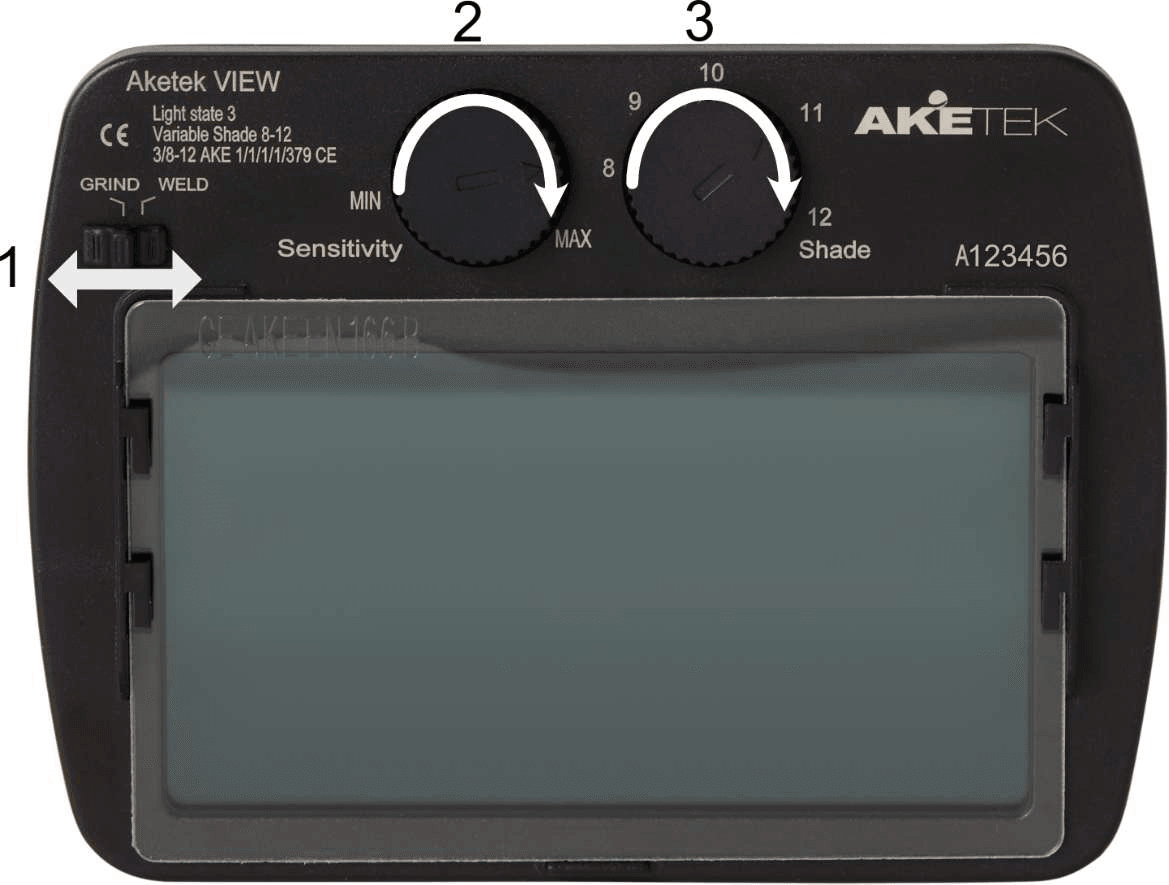
For long-term storage, select GRIND mode to extend battery life.
Introduction
VIEW helmet
These user instructions apply to the AKETEK® VIEW welding helmet equipped with an auto-darkening filter (ADF). The helmet is designed for electric arc welding (MIG/MAG, MMA, TIG), grinding and plasma cutting. It provides reliable protection against ultraviolet radiation (UV), infrared radiation (IR), visible light, sparks and weld spatter when used according to these instructions.
AKETEK® auto-darkening filters must always be used with the welding helmet. The ADF has two sensors at eye level that react independently to welding arcs and darken the filter. After welding, the filter automatically returns to a light state, allowing the welder to keep the helmet on throughout the work and improving safety, efficiency and weld quality.
These instructions must not be removed except by the user of this equipment. Current instructions are available at www.aketek.com.
Areas of application: the helmet must always be fitted with an auto-darkening filter, inner and outer cover plates. Use only for electric arc welding (MIG/MAG, MMA, TIG) and plasma welding in the temperature range −5°C to +55°C (23°F to 131°F).
AIR respirator (PAPR)
The AKETEK® AIR powered air-purifying respirator (PAPR) filters the surrounding air, removing up to 99.9% of dust and particles, and supplies clean air to the helmet. Use it only with compatible AKETEK® AIR helmets, and follow the helmet instructions as well.
Areas of application: use AKETEK® AIR with its P3 particle filter only where dust, metal particles or other solid or liquid particles are present, including welding, grinding, metal cutting and handling building materials that emit hazardous dust.
A particle filter does not protect against gases or vapours. The system is not intended for oxygen-deficient or explosive atmospheres. The employer, or self-employed user, is responsible for determining suitability for the specific work.
Safety & limitations
VIEW helmet


Use the helmet only for electric arc welding, plasma welding and grinding.
The helmet must always be fitted with an AKETEK® auto-darkening filter and inner and outer cover plates.
Before welding, inspect the helmet, welding filter and cover plates for cracks or scratches. Welding with damaged components can prevent the protective equipment from operating and protecting correctly.
Use the helmet only with AKETEK® parts. Substitute components or modifications may impair protection and cause the equipment to no longer comply with the standards.
Modifications, substitute products or cleaning the helmet and its components without carefully reading these instructions can damage the helmet and cause serious injuries. This also voids warranty claims.
Not suitable for driving or road use. The protector can affect recognition of colours and detection of signal lights.
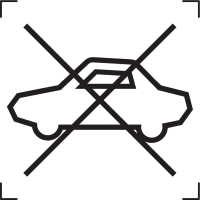
Protectors that have suffered an impact must not be used. Discard and replace them.
AIR respirator (PAPR)
Enter a hazardous environment only when the helmet is correctly assembled, the fan unit is switched on and no warning indicator is lit.
Use the fan unit only with original AKETEK® parts. Substitute components, modifications, or cleaning that does not follow these instructions can impair protection, damage the unit and cause serious injury. They may also void the warranty.
The particle filter does not protect against gases or vapours (A1). The employer, or the self-employed user, must determine whether the respiratory equipment is suitable for the specific application.
Do not use in flammable or explosive environments; where oxygen is below 17% (Europe); where contaminant concentrations exceed TH3P protection; below −5°C or above +55°C; or where there is immediate danger to health or life.
Very intensive breathing can cause negative pressure inside the helmet. If you feel leakage, leave the area immediately and troubleshoot in a safe location. High wind speeds can affect the pressure inside the helmet; use in these conditions is not advised.
Never remove the helmet or switch off the fan unit while in a contaminated area.
Before use
VIEW helmet
Inspect the product before every use. The ADF and both cover plates must be clean and free from cracks or scratches. Replace any damaged helmet parts before use.
Remove the protective film from both sides of new cover plates. Check that all parts are securely fitted.
Switch from GRIND to WELD and check for a brief flicker of the ADF. Select WELD before welding.
If the filter does not darken when an arc is struck, stop welding immediately and follow the troubleshooting instructions.
AIR respirator (PAPR)
Inspect after delivery and before every use for damage, dirt or contaminants. Check the air hose before connecting it.
Fit the P3 HEPA filter, activated-carbon prefilter and spark arrestor. Check that the filter holder is fastened securely and locked. Replace worn or damaged filters immediately.
Connect the hose by pushing in the bayonet coupling and twisting it into place.
Switch on the fan unit and wait for the self-test to finish (see Operating instructions). Then briefly cover the air outlet until the motor speeds up, uncover it and check that the motor slowly returns to normal speed. Do not enter the work area if a warning indicator is lit.
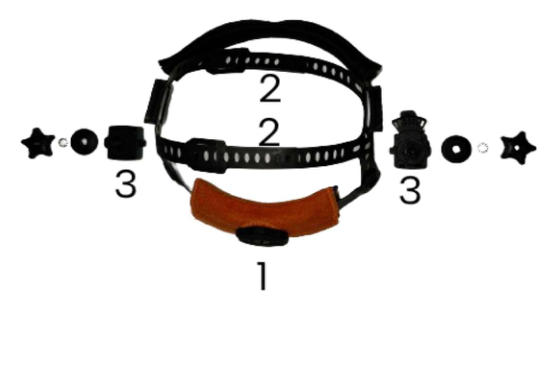
Adjusting the headgear
1. Put on the helmet and turn the rear knob until the headgear fits firmly and comfortably.
2. Adjust the two top straps to suit your head. The flexible neck pad supports a comfortable fit.
3. Press the buttons on both sides and move the headgear forward or backward. Five positions let you adjust the distance to the filter.
4. Adjust the upward/downward angle for a clear field of view. To remove the headgear, press the buttons and slide it out of the holders on both sides.
Operating instructions
VIEW helmet
The ADF is always on: no power-on step is required. In GRIND mode it will not darken. Always select WELD before welding.
The ADF battery life is more than 10 years under normal use. Storing the helmet in a light environment or in GRIND mode can extend battery life. Select GRIND for long-term storage.
If the ADF fails to switch to its dark state in WELD mode, stop welding immediately. Check the troubleshooting chapter before using it again.
AIR respirator (PAPR)
Always follow these steps in order.
1. Switch on: press and hold ON/OFF for about 2 seconds. All indicators light briefly during the self-test and then go out. Do not use the equipment if a warning indicator stays lit or an alarm sounds.
2. Put on the helmet only when the fan unit is running, and adjust it so that the face seal fits closely with no gaps. Never wear the helmet with the fan unit switched off: carbon dioxide can build up quickly, the oxygen level can fall and contaminants can leak in.
3. Enter the hazardous area only with the fan unit running and the helmet securely fitted.
4. Leave the contaminated area before removing the helmet or switching off. To switch off, press and hold ON/OFF for 2 seconds.
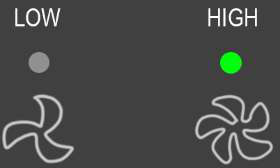
Airflow: press ON/OFF briefly to switch between low (190 l/min) and high (210 l/min) airflow. The indicators are explained under Indicators & alarms.
Indicators & alarms
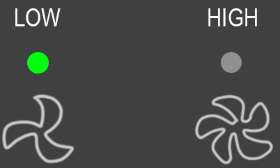
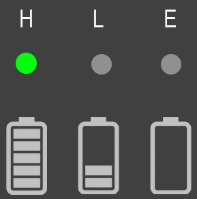
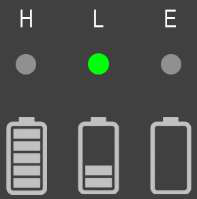
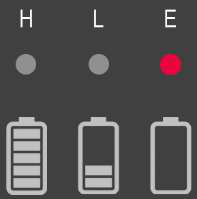
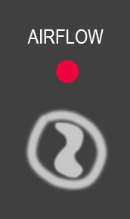
Low airflow alarm: if airflow drops below 145 l/min (±10 l/min) for more than 15 seconds, the alarm activates with audible, visual and vibration signals. Leave the area immediately to troubleshoot.
Low battery alarm: when battery capacity reaches approximately 5%, an audible and visual alarm activates. The unit will run for approximately another 30 minutes before shutting down. Immediately stop work and leave for a safe environment when this alarm activates.
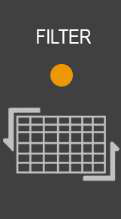
Filter indicator: when the indicator lights up, the filter is providing higher resistance, which affects battery life. You may complete your work, but change the filter after the work shift.
Sensitivity & shade
Sensitivity: turn the “Sensitivity” knob clockwise to increase sensitivity and counterclockwise to reduce it. Use maximum sensitivity unless the application requires a different setting.
Shade: turn the “Shade” knob clockwise to increase the shade number and counterclockwise to decrease it. The available dark-state range is 8–12.
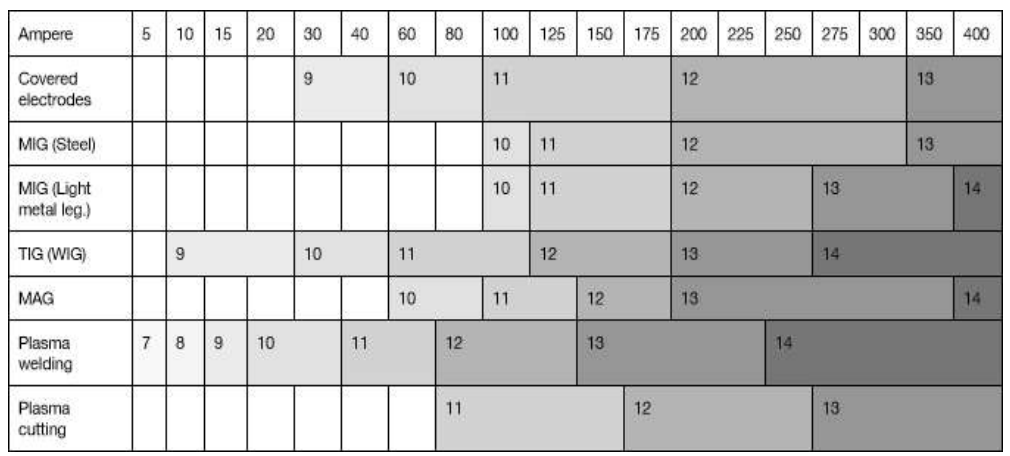
WARNING: Applications requiring shade 13 or higher are not suitable for this ADF.
Maintenance & cleaning
VIEW helmet
The recommended period of use is 5 years, depending on use, cleaning, storage and maintenance. Inspect regularly, replace damaged or defective parts and keep the helmet free from dust and other particles. Handle carefully and keep in a clean environment.
Helmet shell: clean with a damp cloth and water. A damaged shell can be replaced separately.
Outer and inner cover plates: clean with a damp cloth. Replace scratched, damaged or deteriorated plates; transparency can decrease over time.
ADF: no special maintenance is needed over its lifespan. If cleaning is necessary, wipe gently with a clean, soft cloth. Do not use cleaning agents, solvents or other chemicals. Cleaning damage to the filter is not covered by the warranty.
Sweatband: sweatbands from 2026 onwards are washable. Neck pad: do not wash it; replace it periodically for hygiene.
AIR respirator (PAPR)
Wipe the outside of the fan unit with a damp cloth and mild detergent. Do not allow water into the housing or filters. Liquid ingress can permanently damage electronics and invalidate the warranty.
Inspect the breathing hose regularly. Replace it immediately if dirt, detergent residue or other contaminants are inside it. Do not wash the interior of the hose.
AKETEK® AIR has no expiration date. The equipment may be used as long as it remains functional. Regular maintenance can prolong its service life.
Filters
Replace the filters when the orange filter indicator stays lit or battery life has become noticeably shorter. We recommend replacing the prefilter three times for each HEPA filter: fit a new HEPA filter at every third prefilter change.
Never clean filters with compressed air, a vacuum cleaner or any other method. Cleaning can damage the medium and seriously reduce filtration and protection. Tampering with or cleaning filters voids their warranty.
Filter classification does not predict actual service life. Life depends on the environment and contamination; follow the filter alarm.
Check that replacement filters are marked with EN 12941. Filters may carry multiple markings: do not confuse another standard’s marking with the EN 12941 classification of the complete device.
Battery & charging
Use only the manufacturer’s specified charger. Incompatible chargers can cause explosion, injury or death. Charge indoors in a safe place away from welding equipment and flammable materials.
Charge only between 0°C and +40°C. For best life, charge and store between +5°C and +25°C. Do not leave the battery connected to the charger for more than 48 hours.
Do not disassemble, modify, puncture or crush the battery. Damage to safety devices can cause heat, explosion or ignition. Keep dry; do not expose cells to water. Keep away from direct sunlight, heat sources and electrical arcs.
If the battery swells, leaks, appears damaged or becomes abnormally hot during charging, stop using it immediately and store it in a fireproof container for recycling.
Replacing parts
Outer cover plate
- Pull from the lower edge to remove it.
- Remove the film from both sides of the new plate.
- Insert one side, then flex the plate until the other side clips in.
Inner cover plate
- Pull it out of the side holders on the filter.
- Remove the film from both sides of the replacement and slide it into place.
ADF cassette
- Release the locking spring from the two plastic holders and remove the cassette.
- Fit the new cassette with its control knobs at the upper edge facing into the helmet.
- Fold the metal locking spring back and secure it over both holders.
Headgear
- Press the button on top of each bracket to release it.
- Hold the buttons down while sliding the replacement headgear into position.
Sweatband
- Detach it from the headband mounts.
- Fit the new band on the front facing the filter, with the matt side outward; wrap it around and secure it to the same mounts.
Neck pad
- Remove the soft pad and attach a replacement.
Optional magnifying lens
- Fit using the same method as the inner cover plate.
Storage & transport
VIEW helmet
Check that the helmet and its components have not been damaged in transit. Store and transport in the original bag or packaging, in a dry place between −10°C and +40°C, below 90% relative humidity, away from direct sunlight and heat sources.
AIR respirator (PAPR)
Store dry between −10°C and +50°C, below 80% relative humidity; the recommended storage range is +5°C to +25°C. Protect from direct sunlight, dust and airborne contaminants in the original AKETEK® AIR storage bag.
Spare parts
VIEW helmet
Use original AKETEK® parts. Contact a distributor or Aketek support for replacements.
| Part | Part number |
|---|---|
| Outer cover plate | 72005, 72010 |
| Inner cover plate | 71103, 71110 |
| ADF | 12201 |
| Headgear | 12204 |
| Sweatband | 74102, 74105 |
| Neck pad | 75002, 75005 |
| Magnifying lens (+1.0 to +3.0 dioptres) | 77010, 77015, 77020, 77025, 77030 |
AIR respirator (PAPR)
The respirator parts below fit both VIEW AIR and Lift-Up AIR. Only the helmet shell is model-specific.
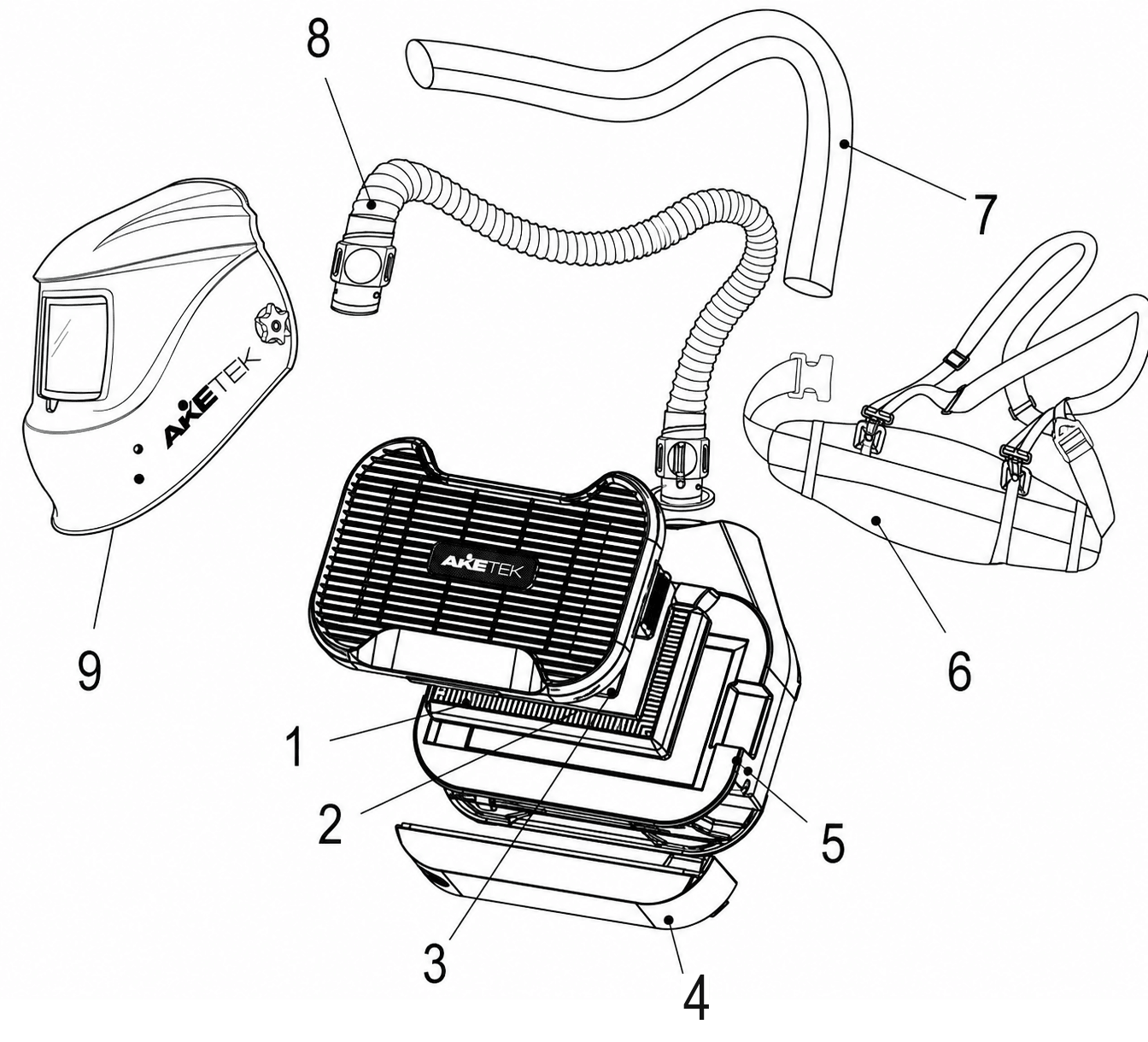
| Part | Part number |
|---|---|
| P3 HEPA particle filter | 81001 |
| Activated-carbon prefilter | 80005 |
| Spark arrestor | 15030 |
| AIR battery | 82001 |
| AIR PAPR unit | 15002 |
| Belt and shoulder straps | 15015 |
| Protective hose cover | 15005 |
| Air hose | 15001 |
| VIEW AIR helmet shell | 12009 |
Troubleshooting
VIEW helmet
| Problem | Solution |
|---|---|
| ADF does not darken | Switch from GRIND to WELD and check for a flicker. If there is no flicker, contact support. Check WELD mode, uncover the sensors and remove dust, then try increasing sensitivity. If it still fails to darken when an arc is struck, stop welding immediately and contact support. |
| ADF stays dark | It may have overheated because it is too close to the weld. Allow it to cool and maintain a safe distance. An Aketek heat-protection plate is available to reduce heat sensitivity. |
| ADF reacts to other welders | Reduce sensitivity. If this continues at lower sensitivity, use curtains or another method to block the other arc. |
| Blurred or distorted view | Check that the protective film has been removed from both sides of the protective plates, including the grinding visor where fitted. |
| Weld spatter on the ADF glass | The filter is permanently damaged and this is not covered by warranty. Always fit the outer and inner cover plates correctly. |
AIR respirator (PAPR)
Always leave the contaminated area before troubleshooting.
| Problem | Solution |
|---|---|
| Filter alarm stays on | Replace filters. If new filters do not resolve it, check for another airflow obstruction, including the hose. Contact support if the alarm persists. |
| Battery alarm | Charge the battery immediately in a safe place. If the alarm continues with a fully charged battery, it may need replacement. |
| Airflow alarm | Check the hose for kinks or obstruction and ensure the outlet is not blocked. Contact support if the alarm persists. |
| Short battery life | High pressure drop makes the fan work harder; replace the filters. An ageing battery may also need replacement. |
| Fan unit will not start | Check that the battery is charged and properly connected. If it still does not work, contact support. |
| Smell or taste of contaminants | Leave immediately. Check that filters are fitted correctly and appropriate for the hazard; replace old filters. Check the face seal for damage or poor fit, including interference from facial hair. |
| Battery will not charge | Make sure the battery is seated correctly in the charger. Check that the ambient temperature is between 0°C and +40°C. Inspect the contacts for corrosion. |
Technical specifications
VIEW helmet
| Feature | Specification |
|---|---|
| Optical performance | 1/1/1/1 (EN 379) / W |
| Switching time | 0.1 ms |
| Angular dependence class | V1 |
| Light state | 3 |
| Lowest dark state | 8 |
| Highest dark state | 12 |
| UV/IR protection | At all times |
| Operating temperature | −5°C – +55°C |
| Viewing area | 100 × 54 mm |
| Weight | 530 g |
| Tested to | ANSI Z87.1; EN ISO 16321-1:2022; EN ISO 16321-2:2021 |
| Shell / filter / headgear materials | PA6 / ABS, glass / PE |
| ADF warranty | 2 years; see warranty chapter |
AIR respirator (PAPR)
| Feature | Specification |
|---|---|
| Airflow: low / high | 190 / 210 l/min |
| Operating temperature | −5°C – +55°C |
| Rechargeable battery | 3300 mAh |
| Runtime: low / high | 16 h / 13 h |
| Filter / class | HEPA / TH3P; P3 TH3 |
| Fan | Brushless |
| Weight | 1.65 kg |
| Dimensions | 200 × 190 × 70 mm |
| Standard listed | EN 12941 |
| PAPR and battery warranty | 1 year |
| Alarms | Low battery: audible and visual. Low airflow: audible, visual and vibration. |
Product markings
VIEW helmet
If the impact-resistance symbols on the lens/filter and helmet differ, the lower level applies to the complete protector.
| Marking | Meaning |
|---|---|
| 16321 | Standard |
| AKE | Manufacturer identification |
| W | Welding filter |
| 14 | Maximum shade number |
| D | Impact resistance (80 m/s) |
| 1-M | Applicable head size |
| Marking | Meaning |
|---|---|
| 16321 | Standard |
| AKE | Manufacturer identification |
| W | Welding filter |
| 3 / 8–12 | Light / dark state shade |
| V1 | Angular dependence class |
| Marking | Meaning |
|---|---|
| AKE | Manufacturer identification |
| 1 | Enhanced optical performance |
| E | Impact resistance (120 m/s) |
| Marking | Meaning |
|---|---|
| AKE | Manufacturer identification |
| 1 | Enhanced optical performance |
| C | Impact resistance (45 m/s) |
| Marking | Meaning |
|---|---|
| 3 | Light state |
| 8–12 | Variable dark shade |
| AKE | Manufacturer identification |
| 1/1/1/1 | Optical class |
| B | Impact resistance (120 m/s) |
| S | Increased robustness |


AIR respirator (PAPR)
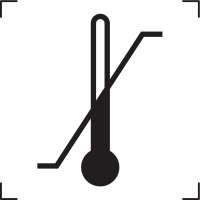
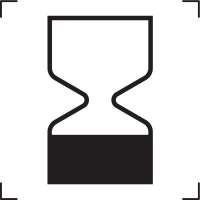
The symbols used on the product are explained below. The table lists the protection classes defined in EN 12941.


| Class | Maximum inward leakage (%) | Maximum particle-filter penetration (%) |
|---|---|---|
| TH1 | 10 | 10 |
| TH2 | 2 | 2 |
| TH3 | 0.2 | 0.2 |
Conformity & notified body
VIEW helmet
EU type examination, module B, for EN ISO 16321-1:2022 / EN ISO 16321-2:2021, performed by:
DIN CERTCO Gesellschaft für Konformitätsbewertung mbH, Alboinstr. 56, D-12103 Berlin, Germany.
Notified body registration number: 0196.
The declaration of conformity is available at www.aketek.com. This document complies with the requirements of Regulation (EU) 2016/425 of the European Parliament and of the Council.
AIR respirator (PAPR)
EU type examination, module C2, for EN 12941:2023, performed by:
Research Institute for Labour and Social Affairs, Jeruzalémská 1283/9, 110 00 Praha 1 – Nové Město, Czech Republic.
Notified body registration number: 1024.
Warranty
VIEW helmet
The ADF has a two-year warranty against defects in materials or workmanship under normal use. Aketek Industries AB will provide repair, replacement or refund for a product or part found defective. Filters that fail to perform as specified within the first two years are replaced without charge.
Keep a copy of the original invoice and the serial number as proof of purchase. The warranty excludes indirect or consequential damage and excludes filters that have been tampered with, misused, abused, improperly maintained, fitted with non-original components or altered from their original configuration.
AIR respirator (PAPR)
The PAPR unit and batteries have a one-year warranty against material or workmanship defects under normal use. The helmet’s ADF has a separate two-year warranty. Remedies are repair, replacement or refund for a product or part found defective. Keep the original invoice and serial number as proof of purchase. The warranty excludes indirect or consequential damages and damage from tampering, misuse, abuse, improper maintenance, non-original components or changes to the original configuration.
Recycling & manufacturer
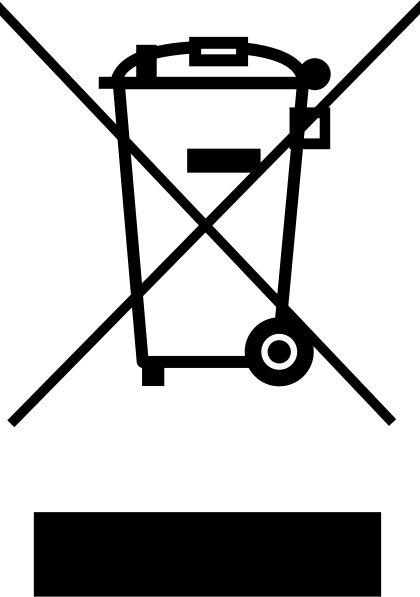
Do not dispose of the product with household waste. It contains electrical components and must be handled as electronic waste. Follow local battery-disposal rules. Contact Aketek support if you need help with disposal.
Manufacturer: Aketek Industries AB, Bernhard Erikssons väg 1B, SE-791 32 Falun, Sweden. VAT: SE556594164701. Website: www.aketek.com.
While every effort has been made to ensure the accuracy and completeness of these instructions, no guarantee or liability can be accepted for any errors or omissions. Aketek Industries AB reserves the right to change the specifications of the product described at any time without prior notice.